AI, Games, and the Environment:
A Responsible User’s Guide

Principles in Practice

These principles in practice are intended to help turn the guiding principles into action and have been developed according to the three thematic groups of the principles.

‍

Environmental Stewardship: Measure, monitor and manage

Measuring and tracking the use of AI tools across your studio is a good first step in beginning to understand the related environmental impact. This process will help you start to understand how and where AI is being used, where the environmental hotspots may be, and how the environmental impacts may affect your environmental goals and carbon reduction targets.

‍

Measuring what you can

‍

Even with data available today we can already track useful information to estimate the environmental impact of using AI tools.

‍

  • Monitoring checklist for studios: data to collect and monitor
  • All usage
  • Service or tool provider
  • Total number of prompts
  • Total number of input and output tokens (or credits)
  • Usage by type such as text generation, code generation, image generation, etc.
  • Specific models used
  • Geographic location where services or compute occurs (if known)
  • For cloud services, additionally capture
  • Type of instances used (e.g., compute, object storage, etc.)
  • Type of servers (e.g., g5.4x large)
  • For models run locally, additionally capture
  • Total system energy consumption of servers/workstations
  • Total system hours during use

‍

Leveraging customer portals and carbon footprint tools provided by your cloud services provider to specifically track your carbon impact for specific projects

‍

  • For usage of AI tools with your cloud service providers, leverage their existing customer portals and carbon footprint tools to specifically track your carbon impact for specific projects. 
    • Consult with your IT team or account administrator to see if this is possible.
    • In some cases, it may be simplest to set up a separate account for AI usage only.
    • In other cases, it may be possible to set up a separate project within an existing account and track emissions through the provider’s customer carbon footprint tooling.

‍

Estimating and monitoring environmental impacts with today’s best approximations

‍

We currently lack transparency from model providers on the environmental impacts of training, deploying and operating models at scale. As a starting point, we can begin to monitor and track usage and approximate environmental impact using today’s best approximations. This approach is not suitable for carbon accounting and reporting, but is helpful to monitor and track usage and can be improved over time as better data and estimation approaches are developed.
‍

There is a lot of ongoing research in this area that gives us some reasonable approximations we can use today to estimate and monitor impacts. Using recent papers and analysis, we can roughly estimate energy consumption from text prompts related to text generation and reasoning. We can also approximate energy per thousand tokens. 

‍

A word of caution: These estimates can be used to give you a rough sense of the energy used for inference and actual energy consumption is dependent on many variables, such as the model used, prompt structure, IT hardware and infrastructure, etc. Furthermore, this space is rapidly evolving and new more capable models are being developed. These figures should not be used for reporting, but are helpful to monitor and track usage and can be improved over time as better data and estimation approaches are developed.

‍

Approximations of energy per query (Wh/query) for large language models (LLMs)
Query complexity Low Medium High
Simple 0.1 0.35 1
Complex 0.5 3.5 20
Simple queries having less than 1000 output tokens and near instantaneous response time (few seconds). Complex queries having more than 1000 output tokens, usually response times in many seconds or minutes.

‍

Approximations of energy per thousand tokens (Wh/1k tokens) for large language models (LLMs)
Query complexity Low Medium High
Simple 0.1 0.35 1
Complex 0.2 0.7 2
Simple queries having less than 1000 output tokens and near instantaneous response time (few seconds). Complex queries having more than 1000 output tokens, usually response times in many seconds or minutes.

‍

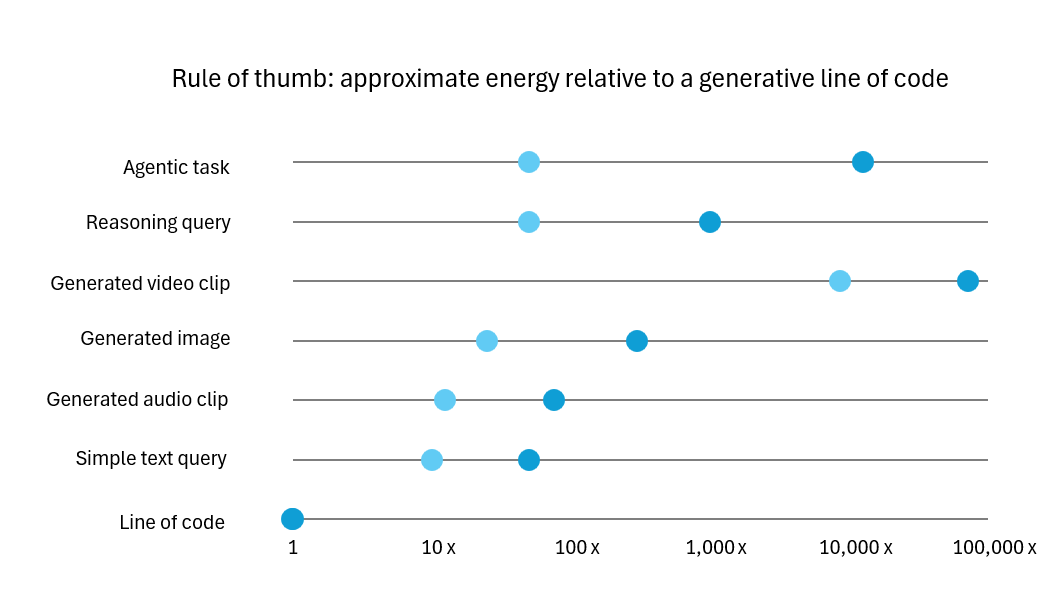
Note: rule of thumb figure above is a rough approximation based on estimated number of tokens per task (and energy consumption  used in the case of video generation) and is helpful to give a relative sense of scale by orders of magnitude, but should not be taken as precise values. Real energy consumption will vary by model, IT hardware, task and input/output characteristics.
‍

‍

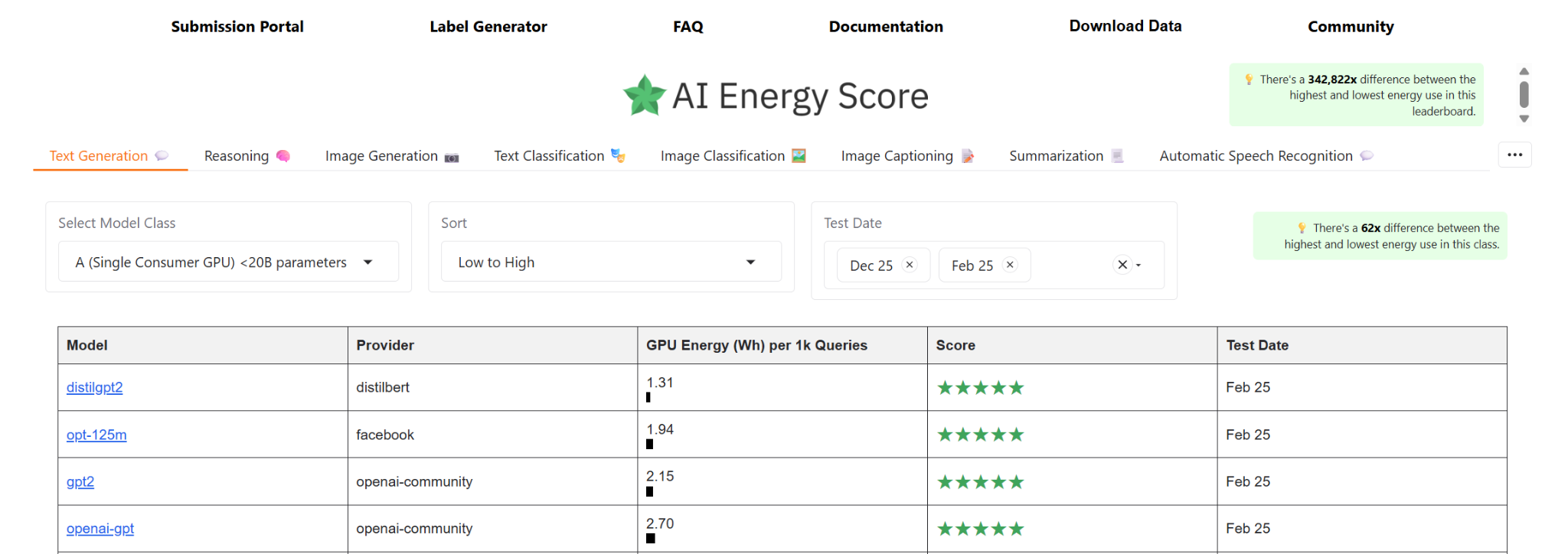
For open models, resources like AI Energy Score and ML.Energy leaderboards can help you assess energy efficiency of models that have been tested on different GPU configurations.

There are also tools that can be used to approximate impact for different uses. While these are not perfect, they can be helpful as reference points and as a starting point to track impact. 

Tools: ecologits calculator

‍

Improving your estimates over time as methods and data evolves

‍

  • Stay up to date on the latest estimation approaches as these evolve and make sure to update your methods over time.

‍

Minimising impact in use

‍Taking an efficiency mindset: use it when it's genuinely helpful and with a frugal approach to minimise both environmental and financial costs

‍

Establish a clear vision and hypothesis for how it will help for each use case, such as:

  • To help solve technical challenges, e.g., reducing memory requirements with neural texture compression.
  • As an assistant, not as a replacement.
  • When genuinely adding value to the player experience.

Consider all available options and technical solutions: Different uses of AI require different approaches:

‍

  • Creative tasks: Have a view of the complexity of the task ahead of time to help make a decision on the right approach. The use of generative AI for creative tasks isn’t “one and done”. Many iterations may be required depending on the creative and technical requirements of the tasks. 
  • Back-end development processes: Generative AI may be helpful to efficiently solve technical challenges on the back-end. However, the use of AI agents without sufficient oversight has the potential to significantly increase AI token usage, costs and corresponding environmental impacts.
  • Technical solutions: Evaluate the various options available for suitability. Many technical problems (such as upscaling) may have existing solutions that don’t necessitate the use of large generative AI models. 
  • In-game AI: Establish guardrails and monitoring systems to set limits on frequency of use so these solutions aren’t simply always-on. The use of generative AI solutions in-game has the potential for higher environmental impact as the solutions scale across the player base. This is particularly the case for agentic implementations. 

Use cost as your guide to help make efficient decisions in use

‍

  • Know your costs (e.g., $/1m tokens) and set limits to avoid waste
Balancing model size, performance and efficiency
Performance Standard Price ($/1M tokens)
Model Arena score (Text, Overall) Input Output
GPT-5.4 nano 1408 $0.20 $1.25
GPT-5.4 mini 1456 $0.75 $4.50
GPT-5.4 1467 $2.50 $15.00
GPT-5.5 1484 $5.00 $30.00
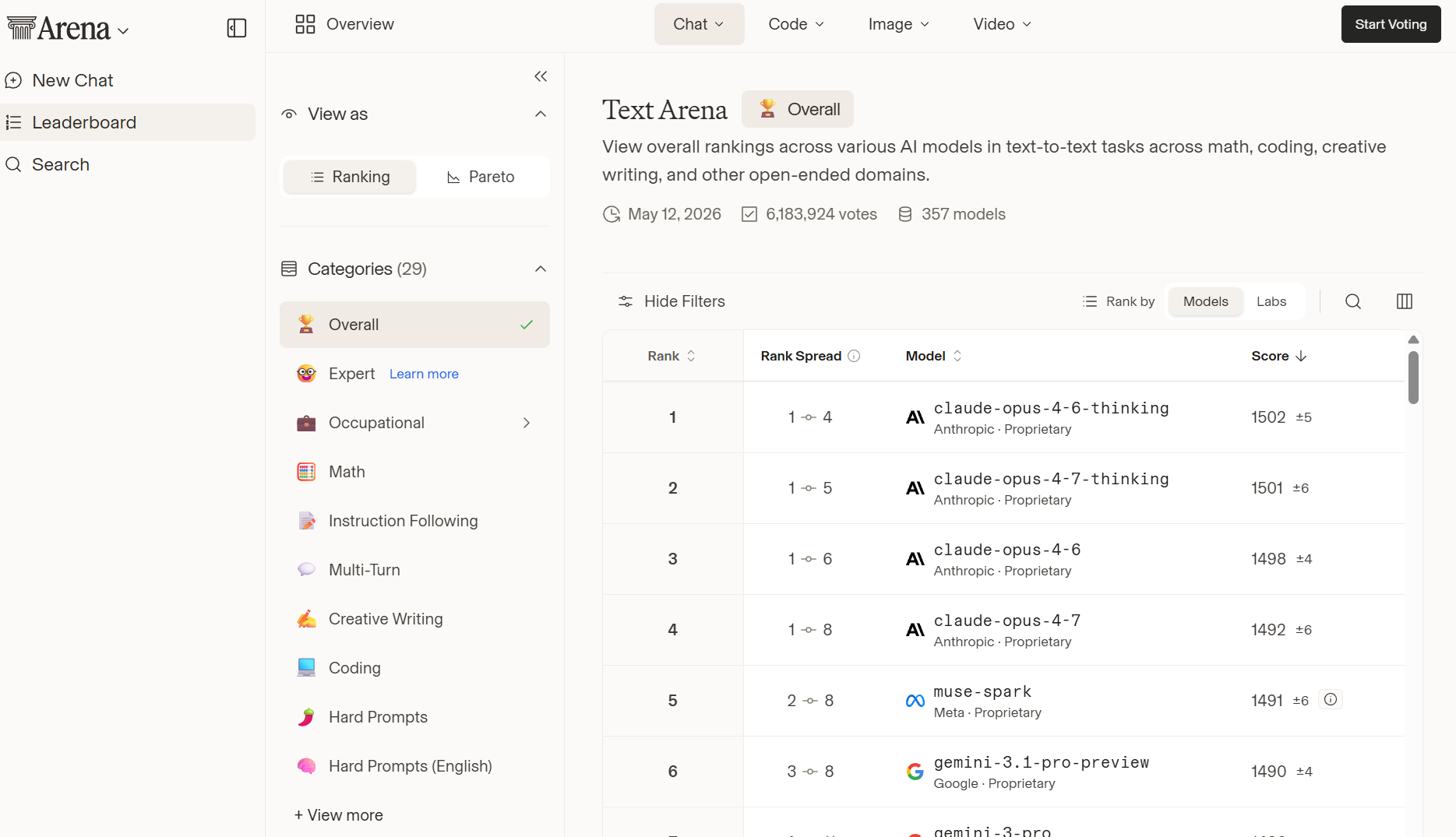
Performance from Arena.ai leaderboard and pricing from openai.com/api/pricing/ as of 13 May 2026

‍

The Frugal Approach to OpenAI API Costs, Frugal.co

‍

  • Consider running models locally for tighter control over energy consumption
    • Local models are not always necessarily more efficient, but they can give greater transparency and control.
    • Local models can help keep data local, may give greater flexibility and control and make it easier to monitor and track energy data.
    • This can give you greater oversight of how you are using and monitoring your environmental impacts related to AI and greater control over emissions through the use of renewable electricity in your own operations.

‍

Use AI Models Locally, Hugging Face

‍

  • Use the right model for the task: when in doubt, start with the most efficient model and assess performance in real-world use.
    • Balance performance with size and capabilities and use available benchmarks to compare models.
    • Smaller models (usually referred to as “small”, “mini”, “nano”, “lightweight” or “efficient” and typically with less than 14B parameters) are more efficient and good for many tasks: they require less compute and less energy and small open models can run on some local devices.
    • Use specialist models for specific tasks, rather than large generalist models

‍

Arena.ai is a helpful resource to gauge perceived model performance (users compare outputs between models and vote for their preference) and compare against model size and costs

‍

‍

Use lower quality settings by default and only transition to higher quality and performance settings when needed. This is particularly helpful for higher compute tasks like image and video generation.

‍

Tips for efficient use

For chatbots, reasoning and coding:

  • Thinking/slow models come at a cost
  • Use instant/fast models for exploration
  • Use thinking/slow models only when you need additional accuracy and precision

For image, audio and video generation:

  • Quality selection has a big impact for image generation, and resolution has a big impact for video generation (i.e., lower quality and lower resolution requires less energy)
  • For general use, exploration or where precision and quality aren’t critical, use fast or low/medium quality models.
  • When higher quality is necessary, you can transition to higher quality models and settings.

For in-game use of generative AI:

  • Use smaller, more specialised models where possible
  • Establish guardrails which set limits on frequency and scale of use, such as avoiding always-on solutions
  • Establish KPIs to monitor and track usage versus expected outcomes

‍

  • Batch prompts for tasks that don’t require instant response

‍

Batch processing allows you to submit multiple requests together for asynchronous processing. This keeps costs lower while enabling more efficient scheduling and processing in the cloud.

Batch processing is a good solution to manage:

  • High volume prompts
  • Large-scale evaluations or analysis which may use more tokens
  • Prompts which aren’t particularly time sensitive
  • Cost efficiency (and by proxy, compute and energy efficiency)
  • Large-scale evaluations

Guidance on batch processing from Claude API, Open AI and Gemini API

‍

Batching prompts for efficiency
Standard Price ($/1M tokens) Batch Price ($/1M tokens)
Model Input Output Input Output
GPT-5.4 $2.50 $15.00 $1.25 $7.50
GPT-5.5 $5.00 $30.00 $2.50 $15.00
Pricing from openai.com/api/pricing/ as of 13 May 2026

‍

Manage tokens by keeping prompts tight, concise and effective and specifying output token limits.

Vetting AI vendors during procurement

Environmental impacts for AI should be integrated into existing assessment of procurement and service providers. You can assess AI service providers using similar sustainability criteria that are applied to other significant suppliers.

Consider whether suppliers publicly disclose environmental performance and climate targets. When information is available, consider whether AI services are supported by data centers with recognized energy certifications or sustainability credentials. Studios can consider a scorecard system or similar to support informed internal decision-making.

‍

  • Vendor screening checklist
  • Carbon reduction targets, such as net zero targets validated through the SBTi
  • Annual reporting of scope 1, 2 and 3 carbon footprint
  • Transparency around electricity sources used, procurement of renewable electricity and water consumption
  • Reporting of energy and emissions associated with AI products and services


Reporting of energy and emissions associated with AI products and services

Environmental performance is only one consideration among others, along with ethics, security, privacy, safety, quality, and commercial requirements. Choose the most suitable options that support your objectives and requirements.

Adapting your carbon reduction plans to stay on track with your targets

For many studios, emissions associated with the usage of AI tools will fall under scope 3 emissions, category 1. For studios with significant usage of cloud-based AI tools, scope 3 emissions related to cloud services could potentially increase meaningfully. However, for many studios, cloud services typically represent a small portion of total emissions.

Studios should review their carbon reduction plans to consider current and future impacts related to their usage of AI, by:

‍

  1. Referencing the last few year’s carbon footprints to understand the scale of emissions related to data centre/cloud services.
  2. Using your best estimates to determine the rough scale of emissions for AI usage today.
  3. Estimate possible future impacts with different scenarios such as low uptake and high uptake scenarios.
  4. Update carbon reduction plans to consider current and future impacts related to AI usage.

We think for many studios that existing carbon reduction targets can still be achievable, but transition plans will need to account for emissions as they are today while also planning for future uncertainties.

‍